THS-100 with Arduino, ESP32, Raspberry Pi and Python
How to wire the THS-100 RS485 Temperature & Humidity Sensor to your own microcontroller or computer and read it over RS485 Modbus RTU. The tables are the ones in the datasheet, and both code examples are run against the datasheet example frame before this page is published.
Product page Datasheet (PDF) Datasheet (Markdown) Arduino sketch (.ino) Python script (.py)
Connecting the THS-100
The probe is an RS485 device, so it needs a transceiver between it and your board. On a computer or a Raspberry Pi that is a USB to RS485 adapter. On a microcontroller it is a MAX485-type module on a hardware serial port. Power the probe from a supply within the voltage range in the table and join its ground to the ground of the transceiver.
| Wire Color | Function | Description |
|---|---|---|
| Red | V+ | Power Supply (5-28 V DC) |
| Black | GND | Power Ground |
| Yellow | RS485-A | Data+ |
| Green | RS485-B | Data- |
Do not swap the A and B data lines. On long runs or buses with many devices, power the sensors locally and fit a 120 Ω termination resistor at the end of the bus.
Python example (Raspberry Pi, Linux, macOS, Windows)
The script needs only pyserial. It builds the Modbus request itself, checks the CRC of the reply and prints one reading every five seconds. On Windows pass the COM port as the argument.
#!/usr/bin/env python3
"""Read the Agrinovo THS-100 over RS485 Modbus RTU.

Works on a Raspberry Pi or any computer with a USB to RS485 adapter.
Install the serial library once:  pip install pyserial
Run:  python3 ths_100.py /dev/ttyUSB0
"""
import struct
import sys
import time

import serial

PORT = sys.argv[1] if len(sys.argv) > 1 else "/dev/ttyUSB0"
ADDRESS = 0x01  # the sensor's Modbus address


def crc16(frame: bytes) -> bytes:
    crc = 0xFFFF
    for byte in frame:
        crc ^= byte
        for _ in range(8):
            crc = (crc >> 1) ^ 0xA001 if crc & 1 else crc >> 1
    return struct.pack("<H", crc)


def read_registers(port, address, function, start, count):
    request = struct.pack(">BBHH", address, function, start, count)
    port.reset_input_buffer()
    port.write(request + crc16(request))
    reply = port.read(5 + 2 * count)
    if len(reply) >= 5 and reply[1] == function | 0x80:
        raise IOError(f"sensor returned Modbus error {reply[2]}")
    if len(reply) != 5 + 2 * count or crc16(reply[:-2]) != reply[-2:]:
        raise IOError("no valid reply from the sensor")
    return reply[3:-2]


def read_probe(port):
    data = read_registers(port, ADDRESS, 0x03, 0x0000, 2)
    return {
        "temperature": struct.unpack(">h", data[2:4])[0] * 0.1,  # °C
        "humidity":    struct.unpack(">H", data[0:2])[0] * 0.1,  # % RH
    }


if __name__ == "__main__":
    with serial.Serial(PORT, 9600, bytesize=8, parity="N", stopbits=1, timeout=1) as port:
        while True:
            print(read_probe(port))
            time.sleep(5)
Arduino example (Uno, Mega, ESP32, ESP8266, MKR, Pico)
The sketch uses the Agrinovo library: in the Arduino IDE open Sketch > Include Library > Manage Libraries and install "Agrinovo". The library picks the serial port for your board, and the pins are listed at the top of AgrinovoDefaultPort.h. DE and RE of the transceiver go to one output pin.
// Agrinovo THS-100 temperature and humidity sensor
// Prints temperature and humidity every 5 seconds.
//
// Sensor cable
//   Red     supply +, 5-28 V DC
//   Black   supply ground, joined to the board's ground
//   Yellow  RS485 A
//   Green   RS485 B
//
// The board talks to the sensor through an RS485 transceiver (MAX485 or
// similar). AgrinovoDefaultPort.h lists the serial pins used on each board.
//
// https://agrinovo.io/products/sensors/environmental/ths-100-rs485-temperature-humidity-sensor/

#include <Agrinovo.h>
#include <AgrinovoDefaultPort.h>

const int DE_PIN = 4;  // transceiver DE and RE, tied together

AgrinovoBus bus(AGRINOVO_PORT, DE_PIN);
AgrinovoTHS100 sensor(bus);  // Modbus address 1

void setup() {
  Serial.begin(115200);
  agrinovoPortBegin(9600);
  bus.begin();
}

void loop() {
  if (sensor.read()) {
    Serial.print("Temperature: ");
    Serial.print(sensor.temperature(), 1);
    Serial.println(" °C");
    Serial.print("Humidity: ");
    Serial.print(sensor.humidity(), 1);
    Serial.println(" % RH");
  } else {
    Serial.println(sensor.errorText());
  }
  delay(5000);
}
What the examples read
Both examples send one request, function 0x03, 2 registers from 0x0000, and decode these values:
| Value | Unit | Register | Encoding |
|---|---|---|---|
| Temperature | °C | 0x0001 | Signed 16-bit integer, scaled |
| Humidity | % RH | 0x0000 | Unsigned 16-bit integer, scaled |
Other Modbus tools
The same request works from any Modbus RTU master: pymodbus, minimalmodbus, Node-RED, LabVIEW, a PLC or a third-party data logger with a Modbus port. Use the serial settings, function code and register addresses above.
Logging without writing code
The Omni Genesis controller reads the THS-100 and sends the readings to the Agrinovo cloud over the cellular network, where they can be exported or read through the cloud API.
Datasheet reference
Specifications
| Parameter | Specification |
|---|---|
| Temperature Range | -40 to +80°C |
| Temperature Accuracy | ±0.3°C (at 25°C) |
| Temperature Resolution | 0.1°C |
| Humidity Range | 0-100% RH (non-condensing) |
| Humidity Accuracy | ±3% RH (at 60% RH, 25°C) |
| Humidity Resolution | 0.1% RH |
| Response Time | ≤15 s temperature, ≤4 s humidity (1 m/s airflow) |
| Measurement Refresh | 2 s |
| Long-term Stability | ≤0.1°C/year, ≤1% RH/year |
| Output | RS485, Modbus-RTU |
| Supply Voltage | 5-28 V DC |
| Power Consumption | ≤0.05 W |
| Protection | Reverse-polarity protection on supply |
| Cable | 4-wire, 1 m standard |
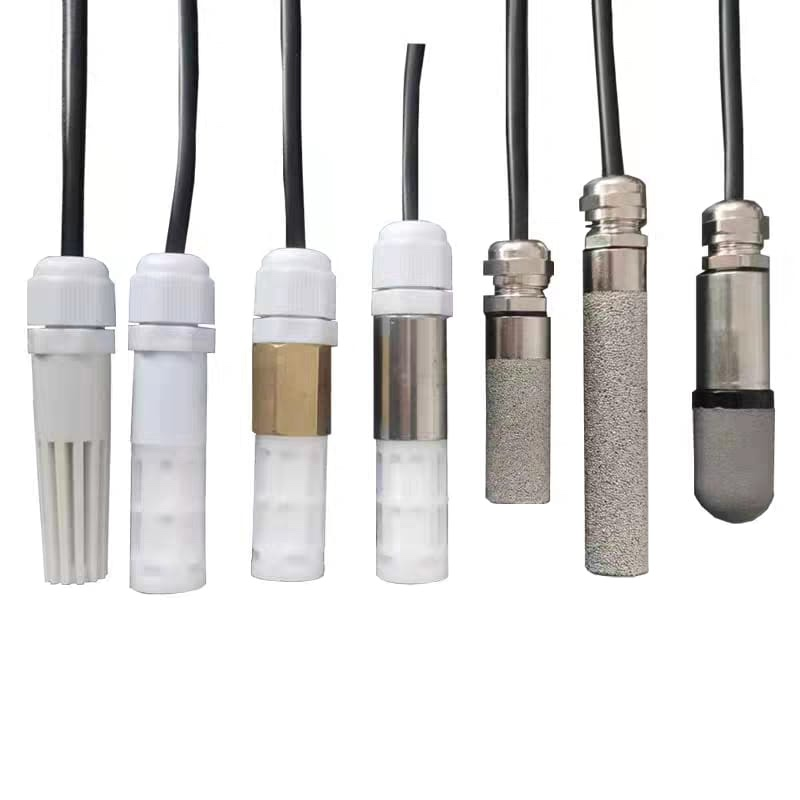
Probe Options
The THS-100 electronics are identical across all housings. Select the probe housing for the environment; specifications and communication are the same for every option.
| Ordering Code | Housing | Dimensions | Environment |
|---|---|---|---|
| THS-100-PVC | Vented PVC cap | Ø12.5 × 68 mm | Indoor air; fastest response; not waterproof |
| THS-100-PP | Sealed polymer | Ø15 × 67 mm | High humidity and outdoor; rain and fog |
| THS-100-BR | Brass body | Ø15 × 68 mm | High humidity and outdoor; rain and fog |
| THS-100-SS | Stainless steel body | Ø15 × 76 mm | High humidity and outdoor; rain and fog |
| THS-100-SM57 | Sintered metal filter | Ø14 × 57 mm | High-dust areas; fast response |
| THS-100-SM87 | Sintered metal filter, long | Ø14 × 87 mm | High-dust areas |
| THS-100-IP67 | IP67 sintered housing | Ø16.5 × 74 mm | Harsh and washdown environments |
Response time is specified with the vented PVC cap. Sealed and sintered housings protect the element in wet and dusty conditions and respond more gradually to fast humidity changes.
Communication Settings
| Parameter | Value |
|---|---|
| Protocol | Modbus-RTU |
| Baud Rate | 9600 bps (default); 2400, 4800 selectable |
| Data Bits | 8 |
| Parity | None |
| Stop Bits | 1 |
| Error Check | CRC-16 |
| Default Address | 0x01 |
Multiple sensors share one RS485 bus, each with a unique address (1-254). Bus length up to 2000 m with proper cabling and termination.
Register Map
Measurement Registers (Function 0x03)
| Address | Description | Scaling |
|---|---|---|
| 0x0000 | Humidity | Value ÷ 10 (% RH) |
| 0x0001 | Temperature | Value ÷ 10 (°C), two’s complement below 0°C |
Configuration Registers (Function 0x03 read / 0x06 write)
| Address | Description | Values |
|---|---|---|
| 0x0100 | Device Address | 1-254, default 1 |
| 0x0101 | Baud Rate | 2: 2400, 3: 4800, 4: 9600 |
| 0x0104 | Temperature Offset | Value ÷ 10 (°C), two’s complement |
| 0x0105 | Humidity Offset | Value ÷ 10 (% RH), two’s complement |
Reading Data
Read humidity and temperature (2 registers from 0x0000):
Request:  01 03 00 00 00 02 C4 0B
Response: 01 03 04 01 E6 FF 9F 1B A0
Decoding:
| Value | Hex | Decimal | Scaling | Result |
|---|---|---|---|---|
| Humidity | 0x01E6 | 486 | ÷10 | 48.6% RH |
| Temperature | 0xFF9F | -97 | ÷10 | -9.7°C |
Negative temperatures are transmitted in two’s complement: 0xFF9F = -97, giving -9.7°C.
Configuration
Change Address (0x01 → 0x02)
Write to register 0x0100:
01 06 01 00 00 02 09 F7
Note: Communication resumes on the new address.
Change Baud Rate (set 9600)
Write to register 0x0101:
01 06 01 01 00 04 D8 35
Offset Adjustment
Field-trim readings against a reference by writing an offset. Example, temperature offset of -0.5°C (0xFFFB) to register 0x0104:
01 06 01 04 FF FB C9 84
Humidity offset works the same way through register 0x0105.
Revision History
| Rev | Date | Changes |
|---|---|---|
| 1.0 | June 2026 | Initial release |
| 1.1 | August 2026 | Layout revision |
| 1.2 | October 2026 | New layout |
Contact
Agrinovo, https://agrinovo.io/products, [email protected], +972 54 688 8148 (direct / WhatsApp). Specifications subject to change without notice.
Questions about wiring or the protocol?
Tell us which board or logger you are using and what you need to measure.