TVOC-100 con Arduino, ESP32, Raspberry Pi y Python
Cómo conectar TVOC-100 Sensor de calidad del aire RS485 a su propio microcontrolador o computadora y obtener lecturas por RS485 Modbus RTU. Las tablas son las de la ficha técnica, y los dos ejemplos de código se ejecutan contra la trama de ejemplo de la ficha técnica antes de publicar esta página.
Página del producto Ficha técnica (PDF) Ficha técnica (Markdown) Sketch de Arduino (.ino) Script de Python (.py)
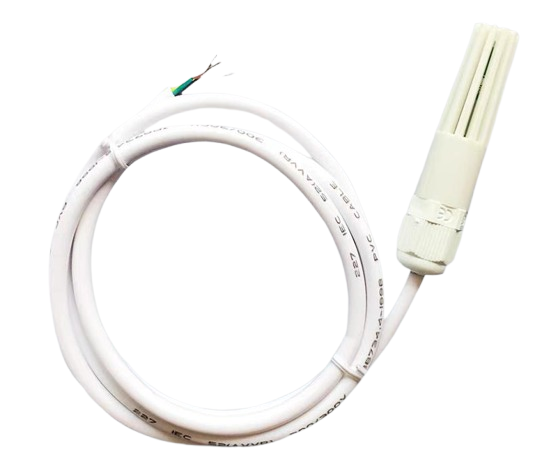
Conexión de TVOC-100
La sonda es un dispositivo RS485, por lo que necesita un transceptor entre ella y su placa. En una computadora o una Raspberry Pi es un adaptador USB a RS485. En un microcontrolador es un módulo tipo MAX485 en un puerto serial por hardware. Alimente la sonda con una fuente dentro del rango de tensión de la tabla y conecte su tierra a la tierra del transceptor.
| Terminal | Function | Description |
|---|---|---|
| V+ | Power | Power Supply (5-12 V DC) |
| GND | Ground | Power Ground |
| A+ | RS485-A | Data+ |
| B- | RS485-B | Data- |
Ejemplo en Python (Raspberry Pi, Linux, macOS, Windows)
El script solo necesita pyserial. Arma la solicitud Modbus por sí mismo, verifica el CRC de la respuesta e imprime una lectura cada cinco segundos. En Windows, pase el puerto COM como argumento.
#!/usr/bin/env python3
"""Read the Agrinovo TVOC-100 over RS485 Modbus RTU.

Works on a Raspberry Pi or any computer with a USB to RS485 adapter.
Install the serial library once:  pip install pyserial
Run:  python3 tvoc_100.py /dev/ttyUSB0
"""
import struct
import sys
import time

import serial

PORT = sys.argv[1] if len(sys.argv) > 1 else "/dev/ttyUSB0"
ADDRESS = 0x01  # the sensor's Modbus address


def crc16(frame: bytes) -> bytes:
    crc = 0xFFFF
    for byte in frame:
        crc ^= byte
        for _ in range(8):
            crc = (crc >> 1) ^ 0xA001 if crc & 1 else crc >> 1
    return struct.pack("<H", crc)


def read_registers(port, address, function, start, count):
    request = struct.pack(">BBHH", address, function, start, count)
    port.reset_input_buffer()
    port.write(request + crc16(request))
    reply = port.read(5 + 2 * count)
    if len(reply) >= 5 and reply[1] == function | 0x80:
        raise IOError(f"sensor returned Modbus error {reply[2]}")
    if len(reply) != 5 + 2 * count or crc16(reply[:-2]) != reply[-2:]:
        raise IOError("no valid reply from the sensor")
    return reply[3:-2]


def read_probe(port):
    data = read_registers(port, ADDRESS, 0x03, 0x0003, 2)
    return {
        "tvoc":           struct.unpack(">H", data[0:2])[0],  # ppb
        "co2_equivalent": struct.unpack(">H", data[2:4])[0],  # ppm
    }


if __name__ == "__main__":
    with serial.Serial(PORT, 9600, bytesize=8, parity="N", stopbits=1, timeout=1) as port:
        while True:
            print(read_probe(port))
            time.sleep(5)
Ejemplo para Arduino (Uno, Mega, ESP32, ESP8266, MKR, Pico)
El sketch usa la biblioteca Agrinovo: en el Arduino IDE abra Sketch > Include Library > Manage Libraries e instale "Agrinovo". La biblioteca elige el puerto serial según la placa, y los pines están al inicio de AgrinovoDefaultPort.h. DE y RE del transceptor van a un mismo pin de salida.
// Agrinovo TVOC-100 TVOC air quality sensor
// Prints TVOC and CO2 equivalent every 5 seconds.
//
// Sensor terminals
//   V+   supply +, 5-12 V DC
//   GND  supply ground, joined to the board's ground
//   A+   RS485 A
//   B-   RS485 B
//
// The board talks to the sensor through an RS485 transceiver (MAX485 or
// similar). AgrinovoDefaultPort.h lists the serial pins used on each board.
//
// https://agrinovo.io/products/sensors/environmental/tvoc-100-rs485-air-quality-sensor/

#include <Agrinovo.h>
#include <AgrinovoDefaultPort.h>

const int DE_PIN = 4;  // transceiver DE and RE, tied together

AgrinovoBus bus(AGRINOVO_PORT, DE_PIN);
AgrinovoTVOC100 sensor(bus);  // Modbus address 1

void setup() {
  Serial.begin(115200);
  agrinovoPortBegin(9600);
  bus.begin();
}

void loop() {
  if (sensor.read()) {
    Serial.print("TVOC: ");
    Serial.print(sensor.tvoc(), 0);
    Serial.println(" ppb");
    Serial.print("CO2 equivalent: ");
    Serial.print(sensor.co2Equivalent(), 0);
    Serial.println(" ppm");
  } else {
    Serial.println(sensor.errorText());
  }
  delay(5000);
}
Qué leen los ejemplos
Ambos ejemplos envían una sola solicitud, función 0x03, 2 registros desde 0x0003, y decodifican estos valores:
| Valor | Unidad | Registro | Codificación |
|---|---|---|---|
| TVOC | ppb | 0x0003 | Entero de 16 bits sin signo, con factor de escala |
| CO2 equivalent | ppm | 0x0004 | Entero de 16 bits sin signo, con factor de escala |
Otras herramientas Modbus
La misma solicitud funciona desde cualquier maestro Modbus RTU: pymodbus, minimalmodbus, Node-RED, LabVIEW, un PLC o un registrador de datos de terceros con puerto Modbus. Use la configuración serial, el código de función y las direcciones de registro indicados arriba.
Registro de datos sin escribir código
El controlador Omni Genesis lee TVOC-100 y envía las lecturas a la nube de Agrinovo por la red celular, donde se pueden exportar o leer mediante la API de la nube.
Referencia de la ficha técnica
Specifications
| Parameter | Specification |
|---|---|
| TVOC Range | 0-60000 ppb |
| TVOC Accuracy | ±1 ppb (0-2008 ppb), ±6 ppb (2008-11110 ppb), ±32 ppb (11110-60000 ppb) |
| CO2eq Range | 400-60000 ppm |
| CO2eq Accuracy | ±1 ppm (400-1479 ppm), ±3 ppm (1479-5144 ppm), ±9 ppm (5144-17597 ppm), ±31 ppm (17597-60000 ppm) |
| Resolution | 1 ppb TVOC, 1 ppm CO2eq |
| Output | RS485, Modbus-RTU |
| Bus Length | Up to 1200 m |
| Supply Voltage | 5-12 V DC |
| Power Consumption | <0.1 W |
| Protection | Built-in surge protection |
| Placement | Indoor, non-condensing |
CO2eq is an equivalent-CO2 air quality value calculated from the VOC measurement. For direct CO2 measurement, pair with a dedicated CO2 sensor.
Communication Settings
| Parameter | Value |
|---|---|
| Protocol | Modbus-RTU |
| Baud Rate | 9600 bps (default); 1200, 2400, 4800, 19200 selectable |
| Data Bits | 8 |
| Parity | None |
| Stop Bits | 1 |
| Error Check | CRC-16 |
| Default Address | 0x01 |
Multiple sensors share one RS485 bus, each with a unique address (1-247).
Register Map
Measurement Registers (Function 0x03 or 0x04)
| Address | Description | Unit |
|---|---|---|
| 0x0003 | TVOC | 1 ppb |
| 0x0004 | CO2eq | 1 ppm |
A register value of 0x8000 indicates a sensing element read error.
Configuration Registers (Function 0x03/0x04 read, 0x06/0x10 write)
| Address | Description | Values |
|---|---|---|
| 0x0064 | Device Address | 1-247, default 1 |
| 0x0065 | Baud Rate | 0: 1200, 1: 2400, 2: 4800, 3: 9600, 4: 19200 |
Reading Data
Read TVOC and CO2eq (2 registers from 0x0003):
Request:  01 03 00 03 00 02 34 0B
Response: 01 03 04 00 7D 02 62 EA A2
Decoding:
| Value | Hex | Decimal | Result |
|---|---|---|---|
| TVOC | 0x007D | 125 | 125 ppb |
| CO2eq | 0x0262 | 610 | 610 ppm |
Address Configuration
Change Address (0x01 → 0x02)
Write to register 0x0064:
01 06 00 64 00 02 49 D4
Broadcast Discovery
With only one sensor on the bus, address 0xFF reads or writes regardless of the configured address. Read the current address:
FF 03 00 64 00 01 D0 0B
Set the address to 0x02 without knowing the current one:
FF 06 00 64 00 02 5C 0A
Change Baud Rate (set 9600)
Write to register 0x0065:
01 06 00 65 00 03 D9 D4
Revision History
| Rev | Date | Changes |
|---|---|---|
| 1.0 | June 2026 | Initial release |
| 1.1 | August 2026 | Layout revision |
| 1.2 | October 2026 | New layout |
Contact
Agrinovo, https://agrinovo.io/products, [email protected], +972 54 688 8148 (direct / WhatsApp). Specifications subject to change without notice.
¿Preguntas sobre el cableado o el protocolo?
Cuéntenos qué placa o registrador usa y qué necesita medir.