GF-201-CH4 עם Arduino, ESP32, Raspberry Pi ו-Python
איך מחברים את חיישן גז דליק GF-201-CH4 למיקרו-בקר או למחשב שלכם וקוראים ממנו ב-RS485 Modbus RTU. הטבלאות הן אלה שבדף הנתונים, ושתי דוגמאות הקוד מורצות מול מסגרת הדוגמה שבדף הנתונים לפני שהעמוד מתפרסם.
עמוד המוצר דף נתונים (PDF) דף נתונים (Markdown) סקיצת Arduino (.ino) סקריפט Python (.py)
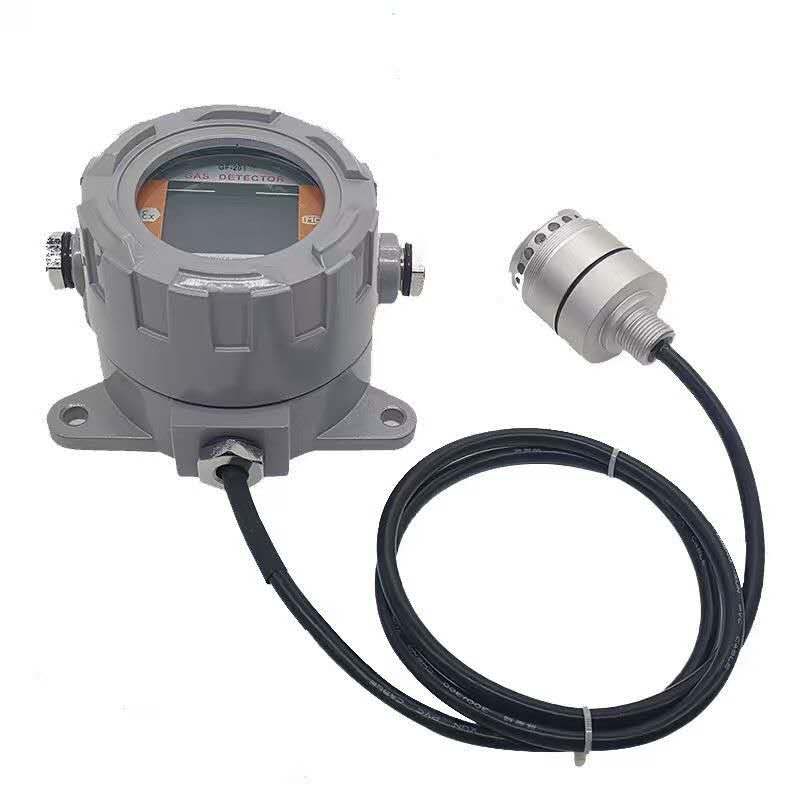
חיבור ה-GF-201-CH4
החיישן הוא התקן RS485, ולכן צריך משדר-מקלט בינו לבין הלוח שלכם. במחשב או ב-Raspberry Pi זה מתאם USB ל-RS485. במיקרו-בקר זה מודול מסוג MAX485 על יציאה טורית חומרתית. הזינו את החיישן מספק שנמצא בטווח המתח שבטבלה, וחברו את האדמה שלו לאדמה של המשדר-מקלט.
Terminals are accessed by unscrewing the enclosure cover. Disconnect power before opening the housing in any area where gas may be present.
Power and Analog Output (P2)
| Terminal | Function | Description |
|---|---|---|
| 24V+ | V+ | Power Supply (12-30 VDC) |
| GND | GND | Power ground / 4-20 mA return |
| mA | 4-20 mA | Analog current output (+) |
RS485 (P3)
| Terminal | Function | Description |
|---|---|---|
| A+ | RS485-A | Data+ |
| B- | RS485-B | Data- |
Alarm Relays
| Terminal | Function | Contact |
|---|---|---|
| P4 (AL) | Low alarm relay | NO, dry contact |
| P5 (AH) | High alarm relay | NO, dry contact |
Relay contacts are voltage-free (passive). Do not exceed the rated contact capacity (AC 120 V 0.5 A / DC 24 V 1 A) or the relay may be damaged. Connect the cable shield to the internal ground terminal.
דוגמת Python (Raspberry Pi, Linux, macOS, Windows)
הסקריפט צריך רק את pyserial. הוא בונה בעצמו את בקשת ה-Modbus, בודק את ה-CRC של התשובה ומדפיס קריאה אחת כל חמש שניות. ב-Windows העבירו את יציאת ה-COM כארגומנט.
#!/usr/bin/env python3
"""Read the Agrinovo GF-201-CH4 over RS485 Modbus RTU.

Works on a Raspberry Pi or any computer with a USB to RS485 adapter.
Install the serial library once:  pip install pyserial
Run:  python3 gf_201_ch4.py /dev/ttyUSB0
"""
import struct
import sys
import time

import serial

PORT = sys.argv[1] if len(sys.argv) > 1 else "/dev/ttyUSB0"
ADDRESS = 0x01  # the sensor's Modbus address


def crc16(frame: bytes) -> bytes:
    crc = 0xFFFF
    for byte in frame:
        crc ^= byte
        for _ in range(8):
            crc = (crc >> 1) ^ 0xA001 if crc & 1 else crc >> 1
    return struct.pack("<H", crc)


def read_registers(port, address, function, start, count):
    request = struct.pack(">BBHH", address, function, start, count)
    port.reset_input_buffer()
    port.write(request + crc16(request))
    reply = port.read(5 + 2 * count)
    if len(reply) >= 5 and reply[1] == function | 0x80:
        raise IOError(f"sensor returned Modbus error {reply[2]}")
    if len(reply) != 5 + 2 * count or crc16(reply[:-2]) != reply[-2:]:
        raise IOError("no valid reply from the sensor")
    return reply[3:-2]


def read_probe(port):
    data = read_registers(port, ADDRESS, 0x03, 0x0000, 1)
    return {
        "combustible_gas": struct.unpack(">H", data[0:2])[0] * 0.1,  # %LEL
    }


if __name__ == "__main__":
    with serial.Serial(PORT, 9600, bytesize=8, parity="N", stopbits=1, timeout=1) as port:
        while True:
            print(read_probe(port))
            time.sleep(5)
דוגמת Arduino (Uno, Mega, ESP32, ESP8266, MKR, Pico)
הסקיצה משתמשת בספריית Agrinovo: ב-Arduino IDE פתחו את Sketch > Include Library > Manage Libraries והתקינו את "Agrinovo". הספרייה בוחרת את היציאה הטורית לפי הלוח, והפינים רשומים בראש הקובץ AgrinovoDefaultPort.h. DE ו-RE של המשדר-מקלט מתחברים לפין יציאה אחד.
// Agrinovo GF-201-CH4 combustible gas detector
// Prints combustible gas every 5 seconds.
//
// Sensor terminals
//   24V+  supply +, 12-30 V DC
//   GND   supply ground, joined to the board's ground
//   A+    RS485 A
//   B-    RS485 B
//
// The board talks to the sensor through an RS485 transceiver (MAX485 or
// similar). AgrinovoDefaultPort.h lists the serial pins used on each board.
//
// https://agrinovo.io/products/sensors/environmental/gf-201-ch4-combustible-gas-sensor/

#include <Agrinovo.h>
#include <AgrinovoDefaultPort.h>

const int DE_PIN = 4;  // transceiver DE and RE, tied together

AgrinovoBus bus(AGRINOVO_PORT, DE_PIN);
AgrinovoGF201CH4 sensor(bus);  // Modbus address 1

void setup() {
  Serial.begin(115200);
  agrinovoPortBegin(9600);
  bus.begin();
}

void loop() {
  if (sensor.read()) {
    Serial.print("Combustible gas: ");
    Serial.print(sensor.combustibleGas(), 1);
    Serial.println(" %LEL");
  } else {
    Serial.println(sensor.errorText());
  }
  delay(5000);
}
מה הדוגמאות קוראות
שתי הדוגמאות שולחות בקשה אחת, פונקציה 0x03, 1 רגיסטרים החל מ-0x0000, ומפענחות את הערכים האלה:
| ערך | יחידה | רגיסטר | קידוד |
|---|---|---|---|
| Combustible gas | %LEL | 0x0000 | מספר שלם של 16 סיביות ללא סימן, עם מקדם קנה מידה |
כלי Modbus אחרים
אותה בקשה עובדת מכל מאסטר Modbus RTU: pymodbus, minimalmodbus, Node-RED, LabVIEW, בקר מתוכנת (PLC) או דאטה לוגר של צד שלישי עם יציאת Modbus. השתמשו בהגדרות התקשורת הטורית, בקוד הפונקציה ובכתובות הרגיסטרים שלמעלה.
איסוף נתונים בלי לכתוב קוד
בקר Omni Genesis קורא את ה-GF-201-CH4 ושולח את הקריאות לענן Agrinovo ברשת הסלולרית, ומשם אפשר לייצא אותן או לקרוא אותן דרך ה-API של הענן.
מתוך דף הנתונים
Specifications
Sensing and Performance
| Parameter | Specification |
|---|---|
| Target Gas | Methane / Combustible (CH₄) |
| Measuring Range | 0-100 %LEL (0-10 %VOL, 0-50 %VOL on request) |
| Resolution | 0.1 %LEL |
| Accuracy | ≤±3% FS |
| Repeatability | ≤±1% |
| Sampling Method | Diffusion (pump-suction optional) |
| Response Time | ≤25 s (T90) |
| Display | LCD with backlight |
| Temperature Compensation | Automatic |
The same detector platform accepts replacement sensing cells for other gases; contact us for the full selection.
Electrical and Outputs
| Parameter | Specification |
|---|---|
| Supply Voltage | 24 VDC (12-30 VDC) |
| Power Consumption | ≤2 W |
| Analog Output | 4-20 mA, 3-wire (2-wire optional) |
| Digital Output | RS485, Modbus-RTU, 4-wire |
| Alarm Output | Two relays, normally open, AC 120 V 0.5 A / DC 24 V 1 A |
Mechanical and Environmental
| Parameter | Specification |
|---|---|
| Mounting | Wall mount or pipe flow-through |
| Enclosure | Aluminium alloy, flameproof |
| Ex Rating | Ex d IIC T6 |
| Protection Rating | IP65 |
| Cable Entry | M20×1.5 internal thread |
| Operating Temperature | -20 to 50°C |
| Humidity | 10-95% RH, non-condensing |
| Pressure Range | 86-106 kPa |
| Dimensions | 196 × 140 × 91 mm |
| Weight | 1.2 kg |
Communication Settings
| Parameter | Value |
|---|---|
| Protocol | Modbus-RTU |
| Baud Rate | 9600 bps |
| Data Bits | 8 |
| Parity | None |
| Stop Bits | 1 |
| Default Address | 0x01 |
RS485 is half-duplex. Use shielded twisted-pair cable, keep the bus below 1200 m, and terminate long runs as needed.
Register Map
Measurement Registers (Function 0x03)
| Address (Hex) | Description | Data Type | Range | Scaling |
|---|---|---|---|---|
| 0x0000 | Gas Concentration | UINT16 | 0-65535 | Value ÷ 10^(decimals) |
| 0x0011 | Resolution (decimal places) | UINT16 | 0-3 | Direct |
| 0x0013 | Full-Scale Range | UINT16 | 0-65535 | Value ÷ 10^(decimals) |
On the 0-100 %LEL / 0.1 %LEL unit the decimal-places register (0x0011) reads 1, so the concentration register (0x0000) is divided by 10 (a raw value of 125 reads as 12.5 %LEL) and the range register (0x0013) reads 1000.
Reading Data
Read one register from 0x0000 to obtain the live concentration:
Request:  01 03 00 00 00 01 84 0A
Response: 01 03 02 XX XX [CRC]
Decoding (decimals = 0):
| Register | Hex | Decimal | Scaling | Result |
|---|---|---|---|---|
| Concentration | 0x007D | 125 | ÷ 10 | 12.5 %LEL |
To confirm scaling on any unit, read register 0x0011 for the number of decimal places and divide the raw concentration by 10 raised to that value.
Address Configuration
The device address is set from the front-panel menu (Settings → Device Address), not over the bus. Assign a unique address to each unit before wiring multiple detectors onto the same RS485 trunk. Example request frames reading concentration from successive addresses:
Address 1:  01 03 00 00 00 01 84 0A
Address 2:  02 03 00 00 00 01 84 39
Address 3:  03 03 00 00 00 01 85 E8
Calibration
Calibration is performed from the front-panel menu and must be carried out by trained personnel using certified gas. Recommended interval is at least once every six months.
Zero Calibration
In clean air with no target gas present, open Calibration → Zero, wait for the reading to stabilise, then save.
Span Calibration
- Apply certified CH₄ span gas (a value near 50% of full scale is recommended) to the sensor for 2-3 minutes.
- Open Calibration → Span and confirm the standard-gas concentration matches the cylinder.
- Wait for the reading to stabilise, then save.
A menu option restores factory calibration parameters if a setting is changed in error.
Revision History
| Rev | Date | Changes |
|---|---|---|
| 1.0 | June 2026 | Initial release |
| 1.1 | August 2026 | Layout revision |
| 1.2 | October 2026 | New layout |
Contact
Agrinovo, https://agrinovo.io/products, [email protected], +972 54 688 8148 (direct / WhatsApp). Specifications subject to change without notice.
שאלות על החיווט או על הפרוטוקול?
ספרו לנו באיזה לוח או דאטה לוגר אתם משתמשים ומה צריך למדוד.